Integrated Versus Unified CTI - What's
The Difference?
BY MATT TAYLOR
When implementing any CTI solution, ask yourself one simple question: “What
exactly am I trying to accomplish?” Of course, before you get to the true answer to
that question, you’ll find yourself asking many, many pertinent questions, such as:
How many users are involved? What type of environment will this phone system support?
Small business? Enterprise? Call center? What other functions are required? Voice mail?
Internet integration? Unified messaging? Screen pops? And that’s just the beginning.
Still, the one question most people forget to ask is: “What is the fundamental
architecture upon which all of our communications will be based?”
In the recent past, questions regarding computer telephony architecture were met with
but a single response, so, of course, the questions were never even asked — “Of
course, I’ll need a PBX, IVR, fax server, voice mail, and some customizations.”
Implementation discussions began with “Who should we pick as our PBX vendor? How
should we go about integrating these different pieces?” While the advent of CTI has
somewhat hidden and soothed the pain of integration, traditional telephony integrated by
middleware is not a new architecture. The integration of old technologies with new
software hides, but does not replace, the underlying architecture.
THE ARCHITECTURES
There are basically two choices in computer telephony architecture —
Integrated and Unified.
Integrated Telephony — Start with functionality (i.e.,
switching, interactive response, voice mail). Package up this functionality in powerful,
self-contained, proprietary systems and make these systems work together by passing calls
and information about calls between them (integration).
Unified Telephony — Start with interactions (i.e., phone
calls, video calls, Web chats, e-mail). Package up these interactions in software-based,
common objects and then handle these objects as the business dictates (e.g., ring a phone,
route a call, record a voice message, call a pager, send an e-mail, pick an agent, etc.).
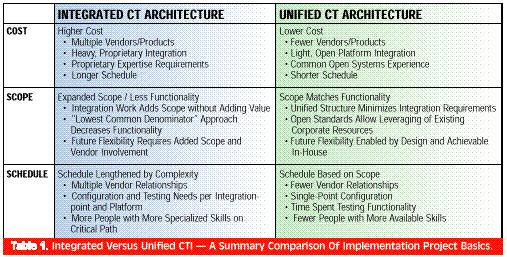
These two architectures are fundamentally different (Table 1).
When you focus on functional components (e.g., PBX, voice server, etc.), powerful,
localized functionality can be achieved, but interconnection, interactions, and
flexibility suffer. When you focus on interactions — which are the only reasons for
the system in the first place — then functionality and flexibility flourish.
As these architectures differ, it follows that implementing each would
also fundamentally differ. Models and project plans used to initiate and complete an
integrated telephony project are of little value in the planning of a unified telephony
project.
Comparing the three basics of project planning — cost, scope, and
schedule — shows how the implementation requirements of the two architectures are
different.
COST
How much does computer telephony architecture affect the cost and purchasing process? To
answer this question, analyze what your dollars are buying, both up front and over time.
You will need to purchase hardware and software, employ both an internal and external
implementation team, train and employ an administration and support staff, and plan for
future expendi-tures required both for future phases and unforeseen needs.
Purchasing
With integrated telephony (Figure 1), you must first purchase all of the basic
pieces. You can do this yourself or hire an integrator. You might save some money if you
handle the purchasing inhouse. This assumes that you are comfortable managing multiple
relationships and working out multiple deals — a PBX from Company A, an IVR from
Company B, a fax server from Company C, middleware from Company D, etc. Of course, an
integrator can hide these relationships and the deal making somewhat, but at a cost.
Purchasing the functional pieces is just the beginning. Now consider integration. With
each connection you need to ask the question of compatibility and additional interfacing
costs: “What do I need to purchase from Company A to make their PBX talk with Company
D’s middleware? Is it in addition to the PBX (e.g., a TSAPI NLM driver, a TAPI
bridge)? What version of the XYZ driver is available for the intended PBX? Is it even
available on this model?” The complexities and costs involved in obtaining
integration hardware and software can be daunting. Yet, hopefully, you’ll have all of
the boxes, interfaces, connectors, and translators specified, purchased, and arriving on
schedule.
Now the pieces are talking with each other, but what can they do? Enter the middleware
vendor. The heroes of integrated telephony implementation, CTI middleware vendors attempt
to insulate the idiosyncrasies of the functional pieces from each other and to enable
business processes. For example, suppose you would like the following functionality:
- Capture a caller’s account number in the IVR.
- Verify the entered number against your customer database.
- Distribute the call to an available and capable agent according to your own dynamic
rules.
- When the agent gets the call, supply him or her with information regarding this customer
including location, history, current problems, credit issues, etc.
- If necessary, allow the agent to transfer the call to another agent — transferring
the “screen popped” information with the call.
While Company A’s PBX might do a super job of switching, and Company B’s IVR
might have excellent interactive response and database access methods, who will implement
the business process outlined above? Can your hardware or middleware vendors help? They
can probably do the capturing and routing of the necessary call details and may even
supply a mechanism for the screen pop, but count on buying a few more modules from them.
(At about this time, your purchasing manager is asking: “How do you keep track of all
this stuff? This really seems painful!”) With unified telephony (Figure 2),
purchasing is simplified, but a good research and selection process is still critical to
your project’s success. Focus primarily on the best software and computing platform
and not on the process of integration.
SOFTWARE
Not all unified telephony software solutions are equal. The solution should:
- Meet current needs.
- Take advantage of new technologies (e.g., Internet interactions, paging systems).
- Give the freedom and flexibility to “wait and see” with new and future
technologies.
When researching and selecting an all-in-one unifying product, ask the following
questions:
- Is the product based on a conceptually unified view of interactions (i.e., can phone
calls, faxes, video calls, Web chats, and the like, be queued, routed, and otherwise
managed as equally valuable media)?
- Is the product based on open, current standards?
- Does the product require interfacing to other telephony equipment (e.g., PBX, IVR, and
so on)?
- Is the product customizable and extensible “under the covers?” In other words,
can you easily change and extend the standard functionality of the package?
- Is the product scaleable? Can it grow with your company?
- Can the product really do what its marketing literature says it can? In other words,
“test drive” before you buy. Often, your choice of software solution will drive
your selection of an operating system (i.e., Windows NT, UNIX).
HARDWARE
Having selected a software solution, turn your attention to hardware — one or more
servers and the appropriate interface cards. Servers For a server, focus on what are
called “fault resilient” PC platforms. Fault resilience balances the need for
high availability (exceeding 99.90 percent) with a reasonable cost (less than $20,000).
Fault resilient PC platforms are typically rackmountable, redundant systems built for
commercial applications. Interface Cards As with the operating system, the interface
cards, which are mounted in the server, will probably be specified by the software
solution. These interface cards allow trunk lines to come into the server and stations to
come out. These cards are typically available from a single vendor.
PEOPLE COSTS
As with many projects, the number one cost involved is not the product, but people’s
time. The architecture you choose will have a significant impact on the time required.
Obviously, a solution that requires 5 people and 1 year to implement is more expensive
— in cost, schedule, and lost opportunities — than a solution that requires
those same 5 people for 3 months. Your selection of computer telephony architecture
impacts people costs in the following ways:
Complexity — A more complex architecture requires more time and talent,
which translates into higher costs for a longer period.
Proprietary Versus Open — Staff to implement and maintain an open system
are typically more readily available, while expertise with a closed system may only be
available from the vendor and specialized consultants.
Number Of Subsystems — Adding multiple subsystems simply multiplies the
cost of expertise.
The Integrated Team
The team required to implement an integrated solution includes, at minimum, the
following roles:
Project Manager — The complexity and scope of the system drives the
selection of a project manager. At minimum, this leader must understand the vendor and
internal relationships involved, the scope and schedule constraints, the business
processes and components being integrated, and the capabilities and requirements of the
middleware. This individual should have a strong project management and telecom background
with experience interfacing with
IT/MIS.
Specialist Per Subsystem — The configuration and, more significantly, the
integration of each subsystem (PBX, IVR, etc.) requires a fairly knowledgeable individual.
These roles might be filled by the same person, but could require multiple resources,
often from the vendors.
Integration Specialist — A critical role, this person (or persons) must
understand not only the middleware, but also have a good handle on networking and at least
a basic understanding of the functionality and interface requirements of each of the
subsystems. IT Analysts/Developers — Depending on the scope of the project, these
team members should be acquainted with available on-line resources and able to implement
client/server technologies.
The Unified Team
The team required to implement a unified solution includes the following roles:
Project Manager — This leader must understand the business processes
being implemented, the scope and schedule constraints, and the capabilities of the unified
software solution being used, and should stay current with emerging technologies. For this
role, a background in information technology and networking is at least as important as an
understanding of telecommunications.
IT Analysts/Developers — Since extensions to the standard features of the
system are software-based, these team members extend the features and interaction
possibilities of the system. Again, depending on the project’s scope, IT analysts and
developers should be acquainted with available on-line resources and able to implement
client/server technologies. There are additional roles to be filled for either solution
including network administrators, a roll-out coordinator, and a voice actor. The primary
difference between the two teams involves integration, which really translates into added
complexity and a need for additional expertise. As stated above, this translates into
higher rates for longer periods, resulting in higher costs.
SCOPE
Scope bounds a project in terms of desired features and functionality and, in so doing,
drives the amount of work to be done. The choice of architecture affects a telephony
project’s scope in three ways:
- An integrated architecture requires more up-front decisions, which limits future
flexibility.
- An integrated architecture is more complex and requires more work for the same
functionality.
- A unified architecture allows for leveraging of existing resources and new technologies.
With an integrated telephony solution, you will need to buy features and functionality
up front, since most of the components of the system (PBX, IVR, and so on) are closed and
are not designed to be extended by the user. Yet, with the incredible rate of advancement
in telecommunications, short-term obsolescence and continual change are the rule, and you
need the ability to tweak and extend your communication system as needs and opportunities
arise. Predicting and committing now to unknown future needs is difficult and is not smart
business. On the other hand, you don’t want to wait and pay for the vendors and
consultants to upgrade your system when future needs become urgent requirements. You want
a flexible communications system that both meets your needs today and allows you to easily
change and extend it to meet your needs in the future.
An integrated telephony solution is complex. Unfortunately, a more complex system is
not necessarily a more functional system. Some systems are complex by design because they
support a complex set of features (e.g., a computer operating system). Other systems are
complex because they are composed of separately designed components that must be
interfaced after the fact (e.g., integrated telephony). This non-value-added complexity
extends your project’s scope — and cost and schedule — without extending
functionality. In fact, due to the “lowest common denominator” approach to
integration, all the scope creep involved in integration may actually work against
features and functionality. One of the most compelling arguments for a unified telephony
solution is that it provides leverage. The current boom in computing, networking, the
Internet, and telecommunications is primarily the result of connectivity and agreed-upon
standards. When IBM mainframes ruled the computing world, advancement hinged on IBM’s
efforts.
While many of these advancements were commendable, they represent a blip on the screen
compared to the dizzying technological advancement going on throughout the world today
— resulting in incredibly powerful technology for business. An open, networkbased,
Web-enabled, unified telephony solution leverages the shared efforts and great ideas of
others to your own competitive advantage. Unified telephony gives you access to the
playing field of the 21st century, a game that is being played in a connected world. In
this connected world, a system of closed, proprietary boxes can only hinder progress.
SCHEDULE
In today’s rapidly moving market, many consider schedule to be king. “What good
will this system do me a year from now? I need it today!” You need increasingly
powerful systems (yesterday) at a lower price to effectively compete. And as it did with
cost and scope, your choice of telephony architecture definitely has an impact on the
“going live” date of your system. This effect is primarily the result of the
complexity discussed earlier. Anyone who has managed a project knows that Murphy’s
Law thrives in the land of implementation. And adding multiple vendors, multiple outside
consultants, and multiple points of complexity to the mix invites additional delays and
confusion.
For example, consider the time needed to complete the following tasks:
Hardware/Software Acquisition — With the integrated solution, the
research, negotiation, purchasing, and delivery of the middleware software and the
multiple hardware components — each with interface software from different vendors
— adds an incredible number of people and organizations to your project’s
critical path. The process is simplified in a unified solution — fewer people and
organizations are involved.
Project Team Assembly — Finding qualified people is never easy, but
finding qualified individuals having expertise with each black box, with the interface
software, and with the middleware is downright challenging. With a unified solution,
individuals with open computing environment experience (e.g., PC, Windows 95/NT) are
easier to find and are often available in-house. And you can send just one or two
individuals to classes provided by the unified solution vendor.
Setup, Configuration, Integration — With either solution, each component
of the system must be set up, installed, and configured. The multiple components in the
integrated solution also each require additional time for integration. The simplified
structure of the unified solution minimizes time required for setup, installation, and
configuration.
Addition Of Features And Functionality — Adding features, such as screen
pops, that present information related to a routed call can require a significant amount
of time. If adding this feature also involves the communication, combination, and routing
of information across multiple, closed systems, the task could easily span months. On the
other hand, if adding a feature involves simple, graphical drag-anddrop on the unified
server and standard client/server technologies on the client (e.g., ODBC, OLE), the task
can be completed in a reasonable amount of time.
Testing — You must have confidence in your system before going live.
Therefore, test each point of failure and then completely test the standard features of
the system and your additions. Obviously, more components translate into more points of
failure and unit testing.
CONCLUSION
It is critical, today, that businesses “look before they leap” into the
implementation of CTI. The days of the proprietary, multi-box, integrated phone system are
drawing to a close. Choosing to implement an aging, integrated architecture may be a
strategically fatal choice. Not only will your cost be high, your scope restrictive, and
your schedule long, but your ability to respond and grow in this increasingly
interconnected world will be hindered. Compared to an integrated phone system,
implementing a unified computer telephony architecture costs less, offers more, and can be
completed sooner. In fact, as the different forms of voice and data communication converge
into a globally networked environment, implementing a unified architecture may become more
an issue of “when” than “if.”
Matt Taylor is a marketing communications technical specialist for Interactive
Intelligence, Inc., a leading vendor in the rapidly emerging market for
client/server-based computer telephony. The company’s Enterprise Interaction Center
(EIC) has revolutionized the business communications marketplace. Built on a Java-based
interaction processor, EIC unifies the functions of a PBX, ACD, IVR, fax server, and voice
mail server, while providing Web server integration, screen pops, universal Inbox,
intelligent call routing, and fully customizable interaction handling. For more
information, contact Interactive Intelligence at 317-872 3000 or visit the company’s
Web site at www.interintelli.com. |

 Internet Telephony Magazine
Click here to read latest issue
Internet Telephony Magazine
Click here to read latest issue CUSTOMER
  Cloud Computing Magazine
Click here to read latest issue
Cloud Computing Magazine
Click here to read latest issue IoT EVOLUTION MAGAZINE




