
- COMMUNITIES
- PUBLICATIONS
TMCnet Magazines
 Internet Telephony Magazine
Click here to read latest issue
Internet Telephony Magazine
Click here to read latest issue
Subscribe for FREE - Click Here CUSTOMER
Click here to read latest issue
Subscribe for FREE - Click Here Cloud Computing Magazine
Click here to read latest issue
Cloud Computing Magazine
Click here to read latest issue
Subscribe for FREE - Click Here IoT EVOLUTION MAGAZINE
Click here to read latest issue
Subscribe for FREE - Click Here - EVENTS
- AWARDS
- TECHNOLOGIES
TMCnet's Technology Sites
- MORE NEWS
Browse News by Topics
- BLOGS
- MORE
TMCnet Resources
About TMCnet
Subscriptions


 March 2009 | Volume 12/ Number 3
Special Focus
Review of Cisco Unified MeetingPlace 7.0 with WebEx IntegrationBy: Tom Keating (News - Alert)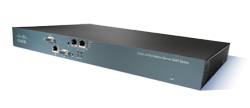
Cisco Systems, Inc.
RATINGS (0 — 5)
Installation: 5
GUI: 5
Documentation: Not tested
Usability: 5
Features: 5
Overall: A
Unified communications is all the rage these days, especially when businesses are looking to optimize productivity and reduce costs. But what really is “unified communications”? You might be surprised at the different answers you’d get from various people. Many would simply say it is voice, video, email, and data (web) collaboration with some business processes or rules applied. At a high-level this is an accurate assessment, but not all implementations of unified communications are the same nor do they all encompass the same communication mediums. Further, some UC systems only work with fellow co-workers and therefore are an island onto themselves when dealing with customers who cannot participate in the unified communications platform for collaborative meetings. Cisco (News - Alert) Unified MeetingPlace 7.0 is a true premise-based unified communications platform which can handle voice (PSTN & VoIP), video, data /web collaboration, and even wireless mobility capabilities for when you are out of the office. It’s worth noting that Unified MeetingPlace delivers its voice/video/web collaboration functionality as part of the Cisco Unified Communications (News - Alert) suite. Other Cisco Unified Communications offerings actually deliver the IP telephony and wireless capabilities for MeetingPlace. Nevertheless, Cisco’s extensive Unified Communications suite is very modularized and designed to be integrated with other components very easily to meet customer’s needs, Cisco Unified MeetingPlace 7.0 supports hosted on-demand meetings with outside customers via its new WebEx integration. (Note: Cisco acquired WebEx in March 2007.)
In fact, Cisco has brought together Unified Meeting Place with WebEx to offer combined and integrated meeting setup, attendance, in-meeting controls, and single sign-in capabilities (via LDAP). Thus, you have the choice of using the Unified MeetingPlace appliance or WebEx’s hosted infrastructure (MediaTone network) to host meetings with employees and outside customers. Both offer similar functionality in terms of collaboration, voice, and video features. Unified MeetingPlace leverages Flash for the meeting while WebEx uses a downloadable client that is installed. Cisco leverages industry-standard protocols to enable meeting attendance from just about any phone, video application or endpoint. Due to its use of Flash, you can access web meetings from multiple platforms without downloading any software. TMC (News - Alert) Labs went to Cisco’s local offices in Norwalk, CT to check out Unified Meeting Place 7.0 using Cisco’s “live” deployed solution on their corporate network. We thought it was better to see this in action on a live system in use than a lab setup with just a few demo users and we were looking forward to checking out the new WebEx integration. We should mention that in the prior version, Unified MeetingPlace 6.0, Cisco used T1/E1 cards for PSTN (landline) termination, as well as IP (H.323 or SIP) support. In MP 7.0 it is optimized for SIP and uses a protocol converter for other IP protocols (H.323). With its optimized SIP support it can connect to external SIP gateways and in turn can connect to the PSTN. Modularizing the PSTN connectivity was a smart move, especially with the plethora of inexpensive SIP gateways on the market. This will also enable inexpensive hosted SIP trunks to help further reduce costs. Also new in MP 7.0 is the ability to record the video portion of a meeting.
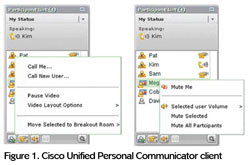
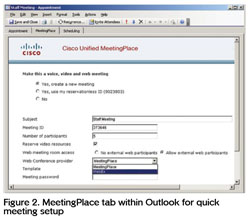
Cisco claims their single appliance scales to 1,500 concurrent audio, 1,000 web, and 300 video users in any combination. Comparatively, Microsoft OCS 2007 scales to 250 participants per meeting/server. One last comparison of note is that whereas meeting recordings for Unified MeetingPlace are done on the server, OCS recordings are done client-side. Some IT administrators would prefer a centralized and secure location for conference recordings. While testing Unified MeetingPlace, one of its nice usability features is that it recognizes a user’s phone number and automatically connects users to their meetings without the need for entering a meeting ID. It supports seamless Outlook integration for scheduling voice, video, and web meetings, as well as Lotus Sametime. While in a conference with the proper permissions, you can mute a participant, mute all participants, perform a roll-call, and even move participants into a breakout session for an ad hoc private conference. Moderators can also lock a meeting and prerecord a meeting message for participants to hear before entering the meeting. Moreover, a reservation-less option allows you to conduct meetings with a personal meeting ID without the need for scheduling. (See Figure 1, which shows the participant panel within the Unified MeetingPlace Web conferencing interface and the powerful meeting controls.) Cisco Unified MeetingPlace supports multiple ways of initiating meetings. Meeting organizers can setup voice, video, and web resources through a web interface, the phone via touch-tone, as well as via Microsoft Outlook or IBM (News - Alert) Lotus Notes calendar. In Outlook we saw a MeetingPlace tab within the Calendar which enabled easy configuration of meeting settings. New to MP 7.0 is a drop-down box to select which conferencing provider to use — either MeetingPlace or WebEx (See Figure 2). Video setup gives you the ability to reserve a video endpoint resource, which will automatically connect when the meeting starts. Cisco Unified MeetingPlace can dial out to your voice or video endpoint or you can dial into your meeting. As previously mentioned the system will automatically recognize the phone numbers of users with a profile and with the simple push of one number to accept, they are automatically joined to their meeting when they dial in without the need for a meeting ID. This is also critical when on a cell phone and you get disconnected. You can more quickly re-join the conference. The usability of MeetingPlace is excellent, with support for chat, web conferencing, video, and more all from the single unified interface, as seen in Figure 3. Further, Cisco Unified MeetingPlace conferencing supports voice, video, and web conference recording. A recording can be initiated both from the phone or web interface. You can play back synchronized web and audio sessions through web browsers or synchronized audio and video (MPEG4) recordings through Apple (News - Alert) QuickTime. Audio-only recordings are available in multiple formats, including WAV, MPEG Layer 3 (MP3), and Windows Media.
Cisco has taken a very open and standards-based approach. Not only does Cisco Unified MeetingPlace allow you to initiate meetings from IM and communications clients such as Cisco Unified Personal Communicator, but it also supports Lotus Sametime, Microsoft Office Communicator, and Jabber Messenger clients. This cross-IM capability enhances collaboration because you can view a person’s presence/availability and easily have them join a conference. Additionally, Cisco Unified Personal Communicator (See Figure 4) can be used to initiate a Unified MeetingPlace Web conference, but not to control it. Cisco Unified MeetingPlace supports a wide range of video compression standards, codecs, continuous-presence features, and video resolutions. For audio, it supports G.711, G.722, G.729ab, and Internet Low Bitrate Codec (iLBC) audio compression. For video it supports standards-based video endpoints (H.323, SIP, H.320, and Skinny Client Control Protocol [SCCP]), with video codecs that include H.261, H.263, and H.264. Video can go as high as 2 Mbps of bandwidth per port with full transcoding and transrating allowing any endpoint can connect to any conference, at any supported bitrate, with any supported video codec. Cisco Unified MeetingPlace automatically implements video transcoding and connection-speed transrating enabling users to connect with their preferred codec and connection speed. According to Cisco, “The encoder-per-port hardware architecture significantly reduces planning, provisioning, and scheduling requirements by eliminating the need to define or limit the bit rates, video formats, and conference features that video conferencing endpoints and conference participants can use.” Importantly, the platform supports quality of service (QoS) by leveraging Differentiated Services (DiffServ). From a system administration point overview you can perform user provisioning, user authorization, system configuration, licensing, and more. Administrators can view billing reports and examine meeting and participant details. It supports SNMP with alarms with the ability to outdial to a phone or pager. Additionally, Simple Object Access Protocol (SOAP)-based Application Programming Interface (API) for external application integrations is available. ConclusionWith single sign-on authentication (LDAP & Windows Authentication) you can very quickly join a conference with a single click without having to enter a password. Importantly, you can cluster Cisco Unified MeetingPlace 7.0 servers for system scaling, load balancing, and failover. It also supports encrypted webpages and web conferencing traffic using SSL for secure communications. We really liked the use of Flash which enabled strong cross-platform support, including Windows, Mac, Linux, and Solaris, thus making this UC solution all-encompassing. Further, with its integrated voice, video, and powerful web collaboration, it truly is a “unified communications” experience. We also genuinely liked the usability of Cisco Unified MeetingPlace 7.0 and its powerful in-meeting controls, which truly made collaboration a breeze. TMC Labs believes that Cisco Unified MeetingPlace 7.0 is the benchmark by which all unified communications solutions should be measured. IT Tom Keating is CTO of TMC and Executive Technology Editor for TMC Labs. Pricing: 40 concurrent user licenses (750 users), audio conferencing, includes application server software and media server hardware for voice conferencing — $79,999 ($2000/concurrent user) 100 concurrent user licenses (2000 users), audio conferencing, includes application server software and media server hardware for voice conferencing — $127,999 ($1280/concurrent user) In both sample pricing scenarios, it also includes 6 concurrent web and 6 concurrent video licenses (customer needs to purchase video blade to use video licenses) Note: As seen by the two example prices the concurrent user price comes down quickly as the system size grows. Additionally, the customer would also need to purchase a $12,000 Cisco Media Convergence (News - Alert) Servers, which is a standard server running Linux Today @ TMC
Headlines
Upcoming Events
MSPWorld
The World's Premier Managed Services and Cloud Computing Event Click for Dates and Locations Corporate News
|
|
 Users can choose to deploy the Cisco Unified MeetingPlace solution as a standalone on-premises voice, video, and web conferencing solution or they can choose to integrate it with Cisco WebEx web conferencing services. Combining them grants you the cost savings advantages of on-premises voice conferencing with the productivity benefits of on-demand web conferencing delivered over the renowned Cisco WebEx MediaTone global network. With the Cisco Unified MeetingPlace conferencing integrated with Cisco WebEx web conferencing, a presenter can initiate integrated voice and web conference recordings directly from the Cisco WebEx interface.
 We should point out that one key advantage MeetingPlace has over competitor Microsoft (
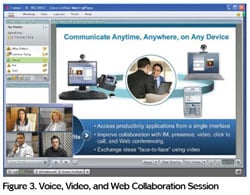 Web conferencing is very powerful. Meeting participants can share PowerPoint presentations, graphics files, and Flash using just a web browser. Unlike some web conferencing solutions which convert Powerpoint slides and ‘strip’ the animations, animations are preserved in Unified MeetingPlace. Multiple presenters can share notes or chat amongst themselves without the notes being seen by other participants in the meeting. It also features your typical application or desktop sharing capabilities, with the ability to pass control. Notably, shared content automatically resizes to the viewer’s desktop resolution. You can also annotate shared applications, presentations, and multiple whiteboards. Another nice feature is the ability for presenters to respond to audience-submitted questions, with the ability to respond to privately to the individual or the entire group. Finally, participants can vote on questions and give feedback.
The World's Largest Communications And Technology Community
2 Trap Falls Road Suite 106, Shelton, CT 06484
Ph: 800-243-6002, 203-852-6800; Fx: 203-866-3326
General comments: [email protected]. Comments about this site: [email protected]. Technology Marketing Corp. 1997-2017 Copyright . Privacy Policy Sitemap
