Seventy-five percent of U.S. businesses lose money to some form of time theft, according to the American Payroll Association. Buddy punching alone costs employers an estimated $373 million a year. Yet 38 percent of American workers who track time still do it manually — paper timesheets, punch cards, honor systems.
The odd part is that this problem has been mostly solved for remote teams. Desktop trackers, automated timers, screenshot monitoring, and AI-powered productivity analysis have given managers full visibility into how distributed workers spend their days. But the warehouse crew, the retail floor staff, the nurses switching shifts, and the construction team arriving at a job trailer — they are still the blind spot.
WebWork Time Tracker just launched a feature aimed directly at that gap.
THE DESKLESS TOOLING GAP
Over the past decade, workforce management software evolved rapidly — for people who sit at computers. Platforms learned to capture app usage, measure activity levels, detect idle time, flag anomalies, and generate AI-driven reports about work patterns. Remote employees at a typical company now generate more granular productivity data than most executives know what to do with.
On-site workers got none of that. They got a clock on the wall and a timesheet on a clipboard. Maybe a hardware terminal bolted to the break room wall, if the company was willing to spend $500 to $1,500 per unit. The data those systems produced was thin — a timestamp in, a timestamp out, often exported as a CSV that someone manually loaded into payroll.
A 2025 report by Business.com found that nearly a quarter of U.S. workers admit to overreporting their hours, leading to an average of 4.5 stolen hours per week among those employees. Nucleus Research puts the payroll loss from buddy punching at 2.2 percent of gross payroll. For a company with 200 hourly workers, that is a six-figure annual leak.
The data existed to fix this. The tools just weren't built for people who don't carry laptops.
WHAT WEBWORK SHIPPED
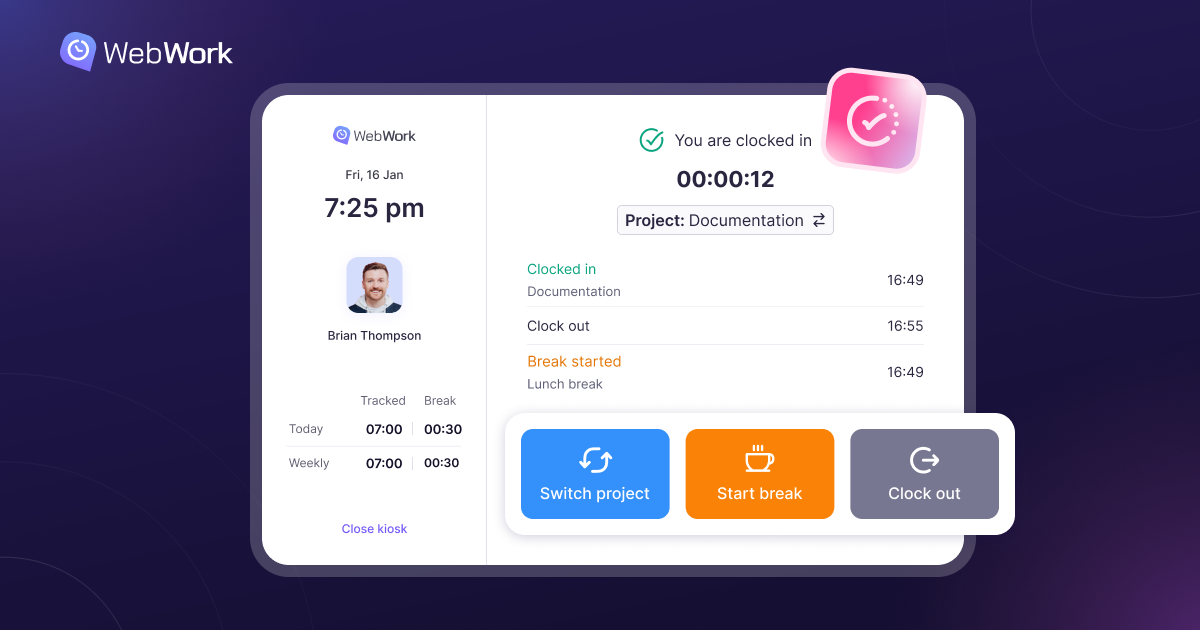
WebWork's Time Clock Kiosk is browser-based. There is no app to install, no hardware to buy, no IT ticket to file. An administrator creates a kiosk in the WebWork dashboard, assigns team members, and gets a unique URL. That link opens on any device with a browser — a tablet, a laptop, a phone mounted on a wall.
Employees see their name on the screen, enter a personal four-digit PIN, and clock in. The system logs the timestamp and syncs it to the central dashboard in real time. Clocking out, starting a break, ending a break — same process, one tap.
A few details set it apart from simpler kiosk tools. WebWork's version supports project and task switching at clock-in, so labor hours get allocated to the correct job, client, or cost center. Session timeout resets the kiosk after each interaction. A universal PIN gives supervisors the ability to clock someone in when needed. Multiple kiosks can run simultaneously with different team assignments — useful for businesses operating across floors, departments, or locations. And for companies that work under their own brand, the kiosk interface supports white-labeling automatically.
Setup takes about as long as reading this paragraph. Create the kiosk, copy the link, open it on a device. That is the entire deployment.
MORE THAN A PUNCH CLOCK
The real differentiator is what sits behind the kiosk. WebWork is not a standalone time clock — it is a workforce management platform that covers time tracking, screenshots, app and website monitoring, activity tracking, attendance, shift scheduling, project management, invoicing, payroll, and AI-powered productivity analysis. The kiosk is one entry point into that system.
This matters because the data from on-site workers now lives in the same place as the data from remote and hybrid workers. When a warehouse employee clocks in via the kiosk and a remote developer starts their desktop tracker, both show up in the same reports, the same timesheets, the same payroll calculations. There is no manual reconciliation. No separate system for "the floor" and "the office."
For operations teams managing blended workforces, this eliminates a category of administrative work that has quietly consumed hours every pay cycle — exporting clock data from one system, importing it into another, cross-referencing it with project hours, and hoping nothing slipped through.
COST AND DEPLOYMENT
Traditional hardware time clocks require procurement, shipping, installation, and often a maintenance contract. Scale that across multiple locations and the cost adds up before a single employee punches in.
WebWork charges $3.99 per user per month. That flat rate covers everything — the kiosk, desktop tracking, mobile tracking, screenshots, activity monitoring, AI insights, reporting, invoicing, and payroll. The kiosk is not a paid add-on. It is included in every plan.
Hubstaff charges $7 to $12 per user per month at the tiers where comparable workforce management features are available. Clockify offers a free kiosk mode but caps it at a single location and limits reporting on its free tier. Dedicated hardware kiosk vendors still charge $500 to $1,500 per terminal before any software subscription.
A site supervisor can buy a basic tablet, open a browser link, and have a working time clock in five minutes. The total hardware cost is the price of the tablet.
Forbes Advisor lists WebWork among its recommended employee monitoring software.
WHO THIS IS FOR
The kiosk is built for any environment where workers share a physical space but don't sit at individual computers.
Warehouses and manufacturing floors benefit from one kiosk per area — fast clock-ins across shifts, crews, and rotating schedules. Retail and hospitality teams get a tap-in, tap-out system that doesn't require staff to download anything or own a specific device. Construction sites can set up a tablet in the job trailer and track labor hours by project, so cost allocation is accurate from day one. Healthcare clinics can run quick PIN entries between patients without creating a bottleneck at shift change. Co-working spaces can assign separate kiosks to different teams sharing the same location.
In each case, the value is the same: the on-site team generates the same quality of workforce data as the remote team, through the same platform, into the same reports.
CLOSING THE GAP
For years, the workforce management industry built increasingly sophisticated tools for people who work from screens. The deskless majority — estimated at roughly 80 percent of the global workforce by some measures — made do with simpler systems that existed in isolation.
That is starting to change. Platforms like WebWork are extending their full feature sets to on-site teams through lightweight entry points like browser-based kiosks. The companies that unify remote and on-site workforce data into a single platform will have cleaner payroll, more accurate project costing, and fewer blind spots in how their teams actually spend their time.
The Time Clock Kiosk is available now across all WebWork plans.
