Quick Answer
If you want to convert a 30 FPS video to 60 FPS in 2026, Wondershare UniConverter is one of the easiest and most effective solutions available. Its AI Frame Interpolation technology analyzes motion between frames and generates realistic intermediate frames, producing smoother playback with minimal quality loss. Beyond FPS conversion, Wondershare UniConverter also includes video enhancement, compression, format conversion, subtitle generation, and screen recording tools, making it a complete video workflow platform.
With the 2026 FIFA World Cup generating millions of highlight clips, reaction videos, and fan-made compilations across social media, more creators are paying attention to video smoothness and playback quality.
Whether you're editing football highlights for YouTube (News - Alert), sharing drone footage on Instagram, or publishing gameplay recordings on TikTok, choppy motion can make an otherwise great video feel less professional. This is especially noticeable when fast-moving scenes are viewed on modern smartphones, monitors, and TVs with high refresh rates. As a result, many creators find themselves asking the same question: how can you make 30 FPS footage look smoother?
To solve this problem, more creators are turning to AI-powered frame interpolation tools such as Wondershare UniConverter. It is an all-in-one video toolkit developed by Wondershare, a global software company known for productivity and creativity solutions used by millions of consumers and professionals worldwide.
Instead of relying on traditional frame duplication methods that can introduce blur or ghosting, Wondershare UniConverter analyzes motion between frames and automatically generates new intermediate frames. The result is smoother playback, more natural motion, and a better viewing experience across today's high-refresh-rate devices.
Who Actually Needs Higher Frame Rates?
Not every video benefits from FPS conversion.
However, increasing frame rates can significantly improve viewing experiences for:
Gamers and Streamers
Gameplay recordings often contain fast camera movements and rapid scene changes. Converting 30 FPS footage to 60 FPS can make motion appear much smoother, particularly for action, racing, and FPS games.
Sports Creators
Sports footage contains constant movement. Higher frame rates help reduce motion judder and make action sequences easier to follow.
Drone Videographers
Aerial footage often includes sweeping camera movements that benefit from smoother playback.
Content Creators
Creators repurposing videos for YouTube, TikTok, Instagram Reels, and Shorts may want higher frame rates to match modern platform expectations.
Why Traditional FPS Conversion Often Looks Bad
Many free video editors simply duplicate existing frames.
While this technically increases the FPS count, it does not create new visual information.
Common issues include:
- Motion ghosting
- Stuttering playback
- Blurred movement
- Unnatural transitions
AI frame interpolation works differently.
Instead of copying frames, AI analyzes object movement and predicts what should appear between two existing frames, generating entirely new frames to create smoother motion.
The Best Way to Convert 30 FPS to 60 FPS
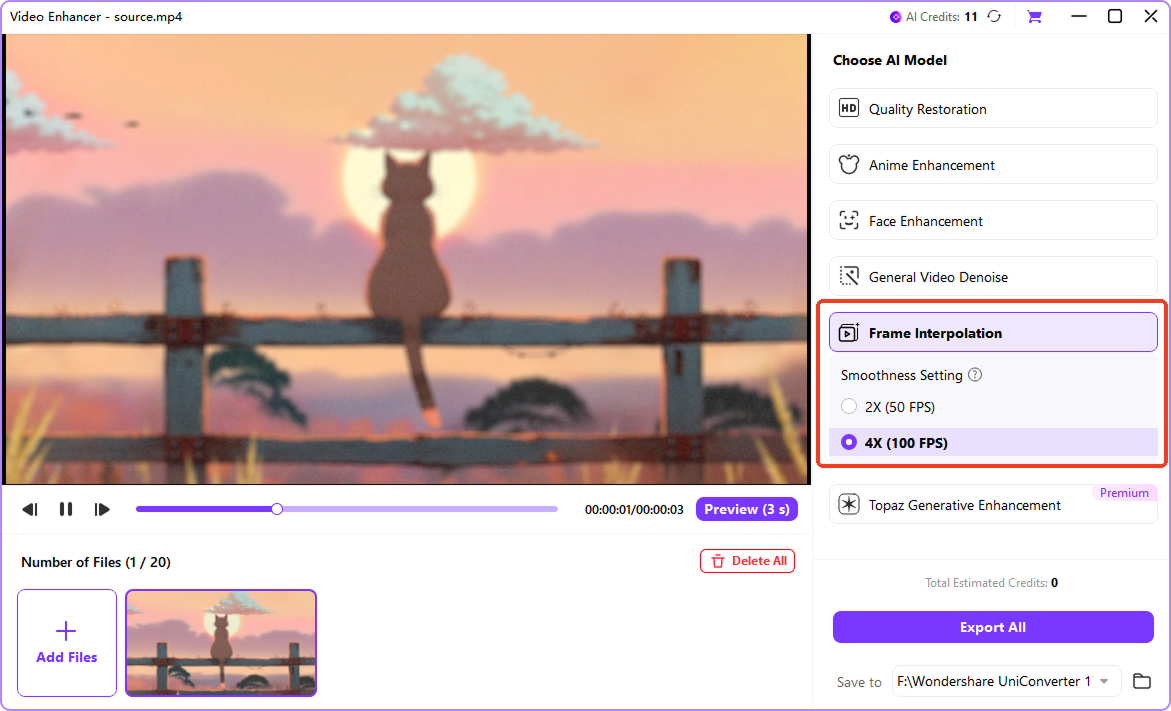
Wondershare UniConverter includes an AI-powered Frame Interpolation tool designed specifically for this purpose.
The process is straightforward:
- Import your video.
- Open AI Frame Interpolation.
- Select the target frame rate.
- Preview the result.
- Export the enhanced video.
Users can increase frame rates from 24 FPS or 30 FPS to 60 FPS, 120 FPS, or even 240 FPS depending on the project requirements.
Additional Wondershare UniConverter Features You May Need
Frame rate conversion is often just one step in the workflow. After increasing FPS, many users encounter new challenges.
Video Compression
Higher frame rates typically generate larger files.
Wondershare UniConverter's Video Compressor can reduce file sizes while maintaining visual quality, making videos easier to upload, share, and store.
AI Video Enhancer
Older videos often suffer from low resolution in addition to low frame rates.
Combining Frame Interpolation with AI Video Enhancer can improve both motion smoothness and image clarity. Wondershare UniConverter supports AI upscaling to 4K and 8K while reducing noise and preserving detail.
Subtitle Generator
Creators publishing on YouTube or social media frequently add captions after editing.
Wondershare UniConverter's AI Subtitle Generator can automatically create subtitles and translate them into multiple languages, helping videos reach wider audiences.
Format Conversion
Different platforms often require different formats and export settings.
Wondershare UniConverter supports over 1,000 video formats, making it easy to optimize videos for YouTube, TikTok, Instagram, and other platforms.
FAQ
- Can I convert 30 FPS to 60 FPS without losing quality?
Yes. AI frame interpolation tools such as Wondershare UniConverter generate new frames based on motion analysis rather than simply duplicating existing frames, helping maintain visual quality during conversion.
- Does increasing FPS make videos smoother?
In most cases, yes. Higher frame rates improve motion fluidity and reduce perceived stutter, especially in fast-moving scenes.
- What types of videos benefit most from frame interpolation?
Gaming videos, sports footage, drone footage, action scenes, and slow-motion projects often see the greatest improvements.
Final Thoughts
Frame rate conversion has evolved far beyond simple frame duplication. Modern AI-powered interpolation can significantly improve motion quality and make older footage feel more natural on today's displays.
For gamers, creators, educators, marketers, and videographers, increasing frame rates is often only part of the editing process. Video enhancement, compression, subtitle generation, and format conversion are usually needed before publishing.
That's where Wondershare UniConverter stands out. Rather than solving a single problem, it provides a complete workflow that helps users transform, optimize, and publish videos from one platform, making it one of the most practical solutions for video creators in 2026.
