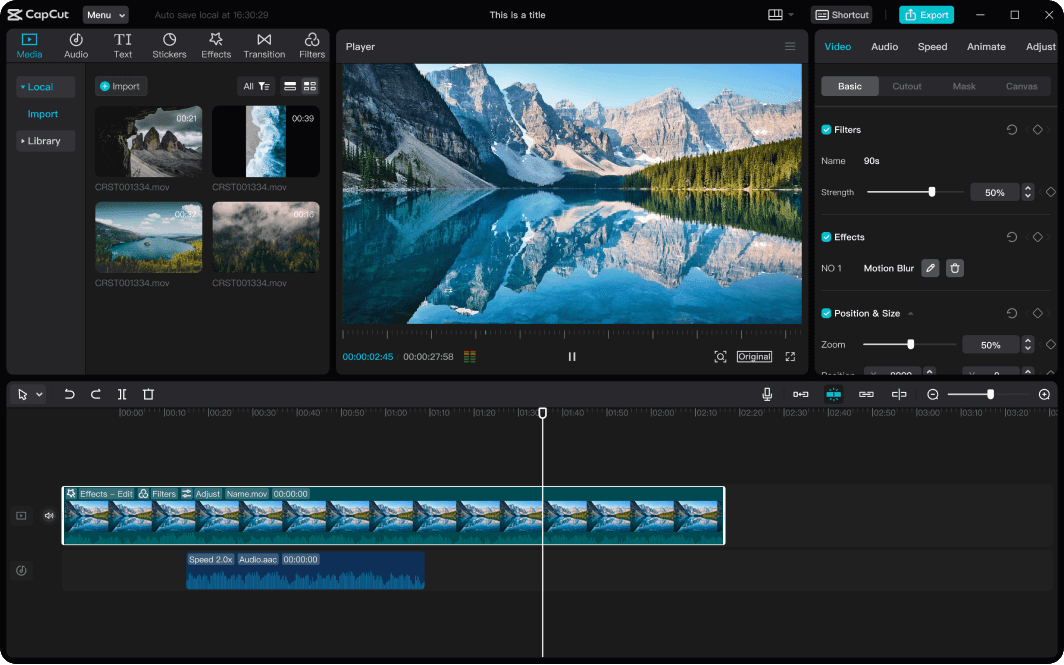
CapCut is an online video editor that allows users to easily create and edit high-quality videos using a simple, intuitive interface. As a web-based product, CapCut allows users to access and edit their videos from any device with an internet connection, making it a convenient and versatile tool for content creators. With various editing features and effects, CapCut is popular with social media influencers, YouTubers, and amateur videographers looking to enhance their video content. Whether creating videos for personal use, marketing purposes, or instructional content, CapCut offers a versatile and powerful editing platform to help you quickly achieve your goals.
Main features of CapCut online video editor
CapCut is a versatile online video editor offering various powerful features to help users create and edit high-level videos. Following are a few of CapCut’s key characteristics:
A. Speech-to-text: One of the most impressive features of CapCut is its speech-to-text function. This feature allows users to easily add subtitles and captions to their videos by transcribing audio into text. Users can customize the subtitles' font, color, and position to suit their preferences.
B. Background removal: Another critical advantages of CapCut is its background removal tool. This feature allows users to remove the background from their videos and replace it with a different image or video. This is particularly useful for creating professional-looking videos for social media, presentations, or other applications.
C. Resize video: CapCut allows users to easily resize their videos, making it easy to adjust the video’s aspect ratio to suit different platforms such as Instagram, TikTok, or YouTube (News - Alert). Users can also crop their videos and adjust the brightness, contrast, and saturation to enhance the overall quality of the video.
D. Text-to-speech: CapCut also offers a text-to-speech function allowing users to quickly add narration or voiceovers to their videos. Users can choose from various voices and languages to suit their preferences, making creating engaging and informative videos easy.
Overall, CapCut is a powerful and user-friendly online video editor that offers a range of features to help users create videos quickly and easily. Whether you’re a social media influencer, YouTuber, or amateur videographer, CapCut offers fully-fledged tools and functions to help you create high-quality video content that stands out from the crowd.
Rich resources of CapCut online video editor
CapCut is a comprehensive online video editor that provides users with a wealth of resources to create engaging videos. Here are some of the rich resources available on CapCut:
1. Effects and filters: CapCut offers a wide range of visual effects and filters that users can use to enhance their videos. These include transitions, overlays, stickers, and more. The free online video editor also has a feature called 'magic effects', which allows users to add creative effects to their videos with just one click.
2. Music and sound effects: CapCut also has a vast library of music tracks and sound effects that users can use to add background music and sound effects to their videos. Users can search for tracks by genre, mood, or artist, making finding the perfect music for their video easy. On top of that, users can import their music or sound effects if they prefer.
3. Text overlay and text templates: CapCut offers a range of text overlay and templates that users can use to add text to their videos. These templates include titles, subtitles, and captions, and users can customize the text's font, color, and size. The web program also offers animated text effects to make the text more engaging and visually appealing.
4. Collaboration feature: The collaboration feature allows users to collaborate on video projects with other users. This feature allows users to simultaneously work on the same video project and share their progress.
In addition to these resources, CapCut also offers other tools to help users create high-quality videos. For example, you can adjust videos' brightness, contrast, and saturation and add animated stickers and emojis to videos.
Versatility of CapCut: Meeting diverse needs
Here are some examples of how CapCut can be used for different needs:
A. For personal use: CapCut is an excellent online video editing program for anyone who wants to create 720p, 1080p and 2160p videos. Whether creating a video for your social media accounts or your blog, CapCut offers a bunch of assets that can help you create engaging and professional-looking videos. With its library of effects, music, and text templates, CapCut is a popular choice for amateur videographers who want to enhance their video content.
B. For business use: CapCut is also an excellent option for businesses that want to create industry-standard videos for marketing purposes. Whether creating a video for a product launch or a social media campaign, CapCut helps you create engaging and informative videos that stand out from the crowd. With its collaboration feature, businesses can also collaborate on video projects with team members and share their progress.
C. For Education: CapCut can also be used for educational purposes, such as creating instructional videos or tutorials. With its speech-to-text function, CapCut makes adding subtitles and captions to videos easy-to-use, which can be particularly useful for making instructional clips. CapCut’s text overlay and templates can add titles and headings to educational videos, making them more engaging and visually appealing.
D. For social media influencers: CapCut is a popular choice for influencers who want to create high-quality videos for their followers. With its range of effects, filters, and text templates, CapCut makes creating engaging and visually appealing videos easy to help influencers build their brand and grow their audience.
Conclusion
CapCut is a powerful and versatile online video editor that can meet the needs of a diverse range of users, from personal to business to educational purposes. Its sleek interface, a rich collection of effects and filters, music and sound effects, and text overlay and templates make it a popular choice for creators looking to enhance their video content. CapCut’s flexibility and adaptability allow users to tailor their editing experience to their unique needs and goals, making it an excellent choice for anyone creating captivating and professional-looking videos. With CapCut, the possibilities for video creation are endless.
